Entra ID Backup and Recovery: What Actually Needs Protecting?
In this article
Cloud identity falls under the shared-responsibility model too. Microsoft now provides native Entra Backup and Recovery for a growing set of directory objects and configurations, which is a big step forward. But native recovery, soft delete, and a complete Entra ID backup and recovery strategy are not the same thing.
A proper Entra ID backup needs to protect more than users and groups. Applications, service principals, policies, authentication settings, privileged access, devices, logs, and tenant-wide configuration can all become part of the recovery problem.
So what actually needs protecting, and where do the native recovery options still have limits?
Let’s go through the main Entra ID objects and configurations one by one.
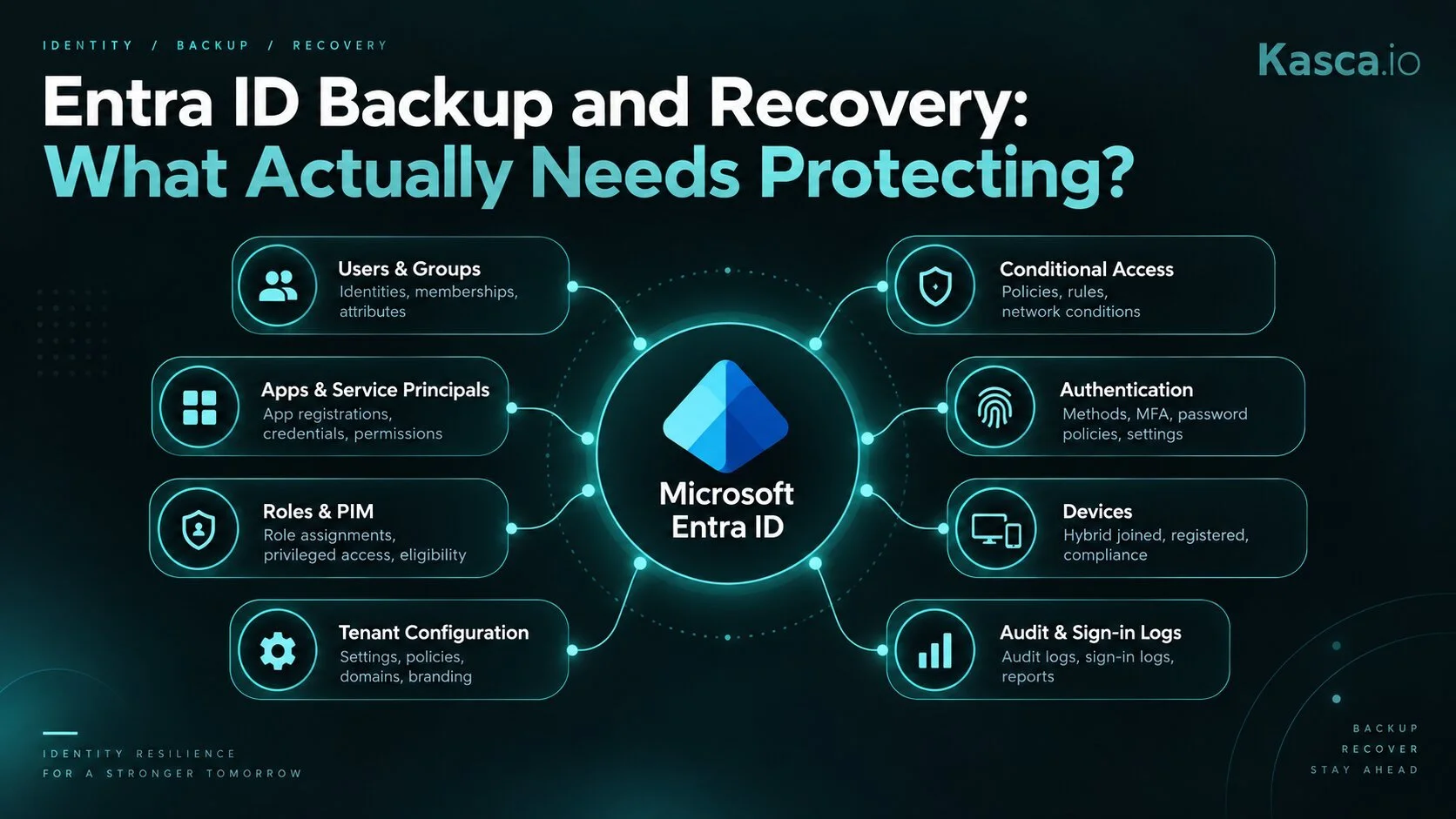
The main identity objects and configuration areas an Entra ID recovery strategy should account for.
Native coverage changes over time, so the exact recovery scope should always be checked against Microsoft’s current documentation.
Core Directory objects
Users, groups, and app registrations are the obvious starting point for any Entra ID backup strategy. Microsoft provides a 30-day soft-delete window for several of these object types, including users, Microsoft 365 groups, cloud security groups, application registrations, and service principals.
But soft delete and backup solve different problems. Soft delete helps when an object was deleted recently. Microsoft Entra Backup and Recovery can also roll supported properties and relationships back to a retained backup state, but it does not currently protect every property, link, or dependency around every supported object.
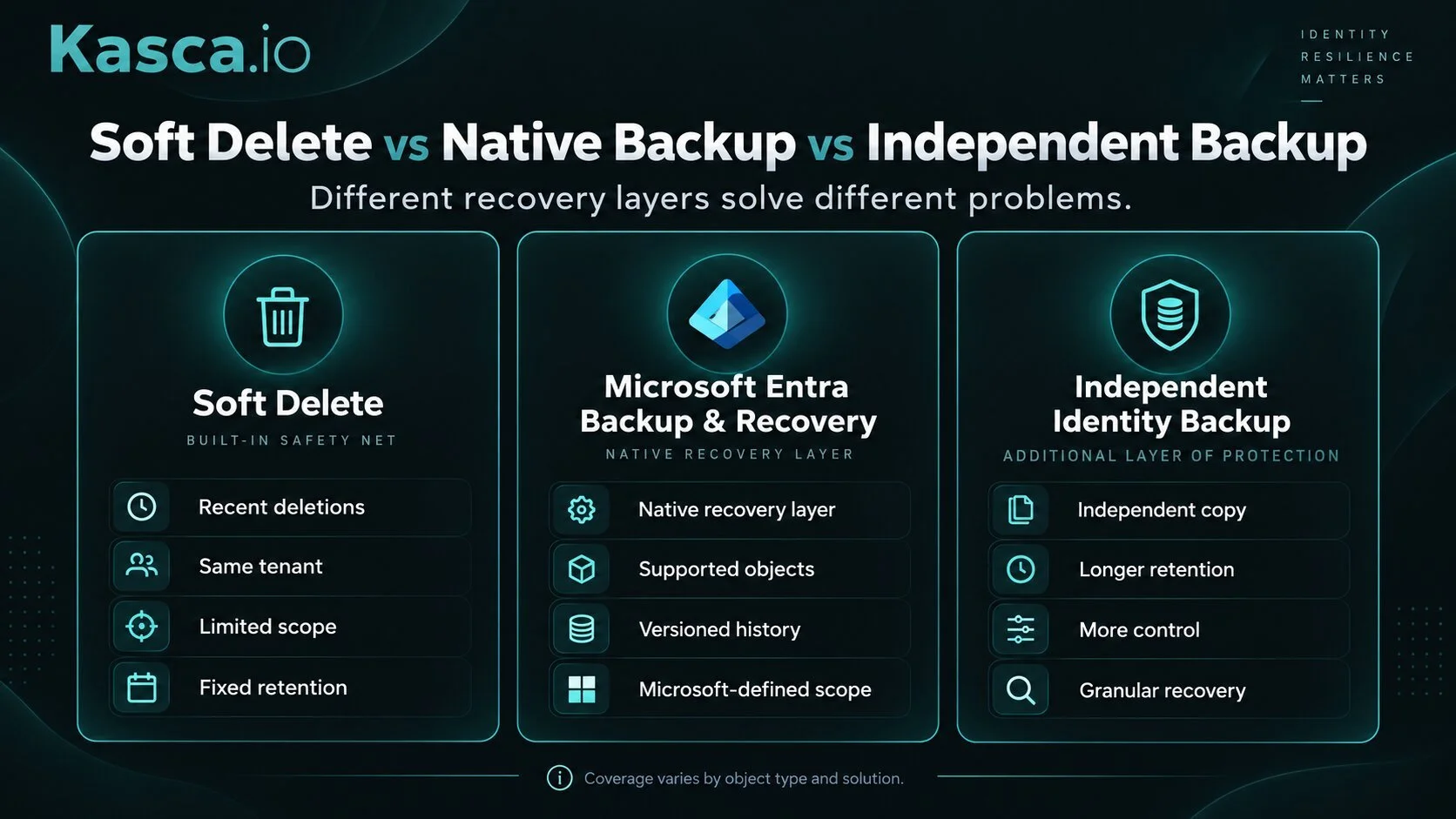
These are the objects everyone assumes are already protected. But the important question isn’t simply whether an object can be restored. It’s how completely it comes back, how far back you can go, and what happens to the properties and relationships around it.
Service principals
Every app registration you create gets a matching service principal — but not every service principal has a matching app registration. Enterprise apps consented from a vendor's catalog, apps published by another organization, and managed identities all show up in your tenant as service principals with nothing local behind them.
Service principals also get a 30-day soft-delete window, but restoring the object doesn’t necessarily restore everything around it. Some attached policies have to be recreated, and Application Proxy configuration needs a separate recovery process instead of simply reappearing with the restored service principal.
Microsoft Entra Backup and Recovery improves the situation, but it still only restores supported application and service principal properties. Managed identities are their own case entirely: they can be soft-deleted and viewed in the recycle bin, but admins still can’t manually restore the deleted managed identity service principal.
Microsoft Entra Backup and Recovery improves the situation, but it still only restores supported application and service principal properties. Managed identities are their own case entirely: they can be soft-deleted and viewed in the recycle bin, but admins still can’t manually restore the deleted managed identity service principal.
Conditional Access policies & Named Locations
Conditional Access is the policy engine behind Zero Trust — it restricts access to company resources based on conditions like location, device compliance, and sign-in risk. Configured wrong, it opens doors to adversaries instead of closing them, or locks out legitimate users entirely. It's easy to make a mistake here, and the consequences can be severe, up to and including locking yourself out of your own tenant.
Being able to roll back to a known-good version of a policy — not just find out something changed — can turn a Conditional Access misconfiguration from a multi-hour incident into a much smaller one.
Microsoft now includes Conditional Access policies and Named Locations in Entra Backup and Recovery, which is a meaningful improvement. The remaining question is how much recovery history your organization needs and whether relying on a single native recovery layer fits your resilience model.
Named Locations are what Conditional Access policies use to define trusted IP ranges — offices, VPNs, partner networks. Rebuilding them from scratch means re-collecting every one of those ranges across the organization — information that usually lives in someone's head or an outdated spreadsheet, not in a single source of truth.
Authentication Methods and Self-Service Password Reset
The Authentication Methods policy decides which sign-in methods — Microsoft Authenticator, FIDO2 security keys, SMS, Temporary Access Pass, certificate-based auth — are allowed in your tenant, and for whom. It’s one of the most security-sensitive configuration areas in the whole directory: get it wrong, and you either lock users out overnight or leave a weak fallback method active that quietly undermines everything else you've configured.
Self-service password reset (SSPR) belongs in the same thread — Microsoft has been actively merging SSPR's method configuration into this same policy, so what proves a sign-in and what resets a password increasingly live in the same settings. SSPR also carries its own layer on top: who it's enabled for, and how many verification methods someone needs before they can reset their own password. Get that wrong in either direction and it costs you — require too many methods and the help desk drowns in tickets from people who can't self-serve; require too few and you've handed an attacker a password reset behind a single phone call.
Configuration changes are different from object deletion. There isn’t a recycle bin that simply brings yesterday’s policy back once someone changes a setting.
Microsoft Entra Backup and Recovery now covers the Authentication Methods policy and can also recover several user authentication methods. That makes this a good example of why Entra ID backup and recovery needs to cover configuration state as well as deleted directory objects.
External Access
External collaboration settings decide who can invite a guest into your tenant, from which domains, and how much a guest can see once they're in. The guest accounts themselves are users, like anyone else in the directory — what's different here is the configuration that decides who gets to hand out that access in the first place. Loosen it by accident — say, letting any member invite anyone, or dropping a domain restriction — and you've opened an invitation path that's hard to notice until someone's already used it.
Cross-tenant access settings are the other half: the specific trust rules your organization has negotiated with individual partner tenants — which of their MFA and device-compliance claims you'll accept, what your users can do in their tenant and vice versa. For an organization with real partnerships, this is often weeks of negotiation and testing distilled into a handful of settings. Overwrite it or reset it to default, and none of that history comes back — you're renegotiating from scratch, this time with a partner asking why their access just broke.
These settings are configuration rather than traditional directory objects, so the familiar 30-day soft-delete model doesn’t solve the problem. Microsoft Backup and Recovery covers selected authorization-policy properties, but an identity recovery plan should still verify exactly how external collaboration and cross-tenant access settings are protected.
Roles, Role assignments & Entra PIM
Custom roles and role assignments don't seem like a big risk at first glance. But your company hasn't existed for a year — it's existed for years, and in that time you've built your own way of managing access. You use specific roles for specific tasks, adjusted to how your teams actually work, which likely drifts from Microsoft's official best practice. None of that lives anywhere except inside the tenant itself.
You might also be running Entra PIM, with a mix of eligible and permanent assignments already configured — specific activation windows, specific approval workflows, tuned over time to match how your organization actually operates. If that configuration disappears, you're not just facing an access gap. You're rebuilding governance rules from memory, under pressure, while privileged access sits either wide open or locked down until someone gets it right again.
Privileged-access configuration is therefore something worth testing explicitly in your recovery plan rather than simply assuming it is covered.
Devices, LAPS & BitLocker
Devices enrolled in the tenant — company-owned or BYOD, registered so people can use Microsoft 365 apps like Teams and Outlook — are part of your identity surface too. Personal devices aren't the concern here. Company devices are: delete one from Entra ID, and its LAPS password and BitLocker recovery key go with it, which can leave an otherwise-fine machine locked out and unusable.
Microsoft introduced device soft delete in preview in 2026 for exactly this scenario, giving you a 30-day window to recover a deleted device along with its BitLocker key and LAPS password. It's a real improvement — but it's still a fixed window set by Microsoft, still preview, and once those 30 days pass, the data is gone permanently and the device has to be rebuilt from scratch. Same shape as everything else on this list: native recovery exists, it's just bounded by someone else's clock.
Sign-in & Audit logs
Microsoft Entra keeps audit and sign-in logs for 7 days on the Free tier and 30 days with Entra ID P1 or P2. If you need them longer, the data has to be retained somewhere beyond the default Entra window — for example by routing it to Azure Storage or another supported analytics and archival service.
That means long-term log retention is not automatic. It has to be designed, configured, and maintained separately.
That window matters more than it looks. A slow-moving attacker — someone probing quietly, or an insider covering their tracks — can easily outlast 7 to 30 days before anyone has a reason to go looking. By the time you ask "who did this, and when," the native logs that would answer that question are already gone. This data is crucial for observability — knowing who did what in your tenant — which makes it exactly the wrong kind of data to lose simply because the native retention window expired.
Tenant-wide settings: the smaller things that still bite
A few more settings don't need a full section each, but losing them still costs real time.
Custom domain names and their federation configuration decide how sign-in actually works for everyone using that domain — whether Entra ID handles authentication directly or delegates it to an on-premises system. Getting this wrong, or losing track of what it was set to, is a well-documented source of lockouts and security incidents.
Custom branding is mostly cosmetic — logo, background, colors — except for one field that isn't: the sign-in page text, which Microsoft explicitly designed to carry things like legal notices. For an organization required to display a login banner for compliance reasons, that's a real control hiding inside what looks like a marketing setting. Clear it by accident, or let it revert to default, and you may have to reconstruct the setting manually. If that text carries a legal or compliance notice, it stops being a cosmetic detail and becomes something worth including in configuration backup and change control.
Cross-tenant sync matters mainly if your organization runs more than one tenant — after a merger, an acquisition, or a deliberate multi-tenant structure. It defines what gets synced between tenants and how attributes map from one to the other. Losing that configuration doesn't break sign-in outright, but it quietly stops provisioning, and nobody notices until someone new doesn't have access they should have.
All three are configuration-heavy areas where traditional object soft delete is of limited help. The important thing is to know which settings are actually versioned and recoverable before you discover the answer during an incident.
What should a complete Entra ID backup strategy cover?
By this point, the pattern is fairly clear. Entra ID backup is not just about keeping a copy of users and groups.
A practical recovery strategy should answer a few much less comfortable questions:
How far back can you recover?
Can you recover a hard-deleted object, or only something still inside a native recycle window?
Which object properties and relationships actually come back?
Can configuration changes be rolled back, not just deletions?
Are audit and sign-in logs available long enough for an investigation?
Does the recovery copy live independently of the tenant and service it is supposed to protect?
Can you restore individual objects without rolling back unrelated changes?
Who can actually access the recovery layer and trigger a restore when the tenant is already in trouble?
Who can actually access the recovery layer and trigger a restore when the tenant is already in trouble?Native recovery can solve part of that problem. The rest depends on what your organization actually considers an acceptable recovery point, recovery time, and level of independence.
Closing
Microsoft Entra Backup and Recovery is a major improvement to native identity recoverability, and its coverage is expanding. But it still protects a defined set of objects, properties, and relationships rather than every part of an Entra tenant.
Native Backup and Recovery currently gives you up to seven days of backup history. Soft delete gives several object types a longer 30-day recovery window, but it is a different mechanism — and an administrator can permanently delete an object before that window expires.
Once an object is hard-deleted, Microsoft Entra Backup and Recovery cannot recreate it. Native recovery also covers only supported properties and relationships, while users and groups whose source of authority remains on-premises Active Directory have to be recovered there.
None of that makes Microsoft’s native recovery unhelpful. It just means you still need to decide how much history, independence, granularity, and configuration coverage your own recovery requirements actually demand.
Kasca is built specifically for cloud identity backup and recovery, with customer-controlled infrastructure, granular recovery, and long-term retention.
If you want to see how that works in practice, explore our Microsoft Entra ID Backup solution.
Protect what your identity environment depends on
See how Kasca adds a customer-controlled backup layer for Microsoft Entra ID with granular recovery, long-term retention, and protection beyond native recovery options.
Entra ID Backup and Recovery FAQ
Quick answers to some of the most common questions about native Microsoft Entra recovery, backup roles, licensing, soft delete, and identity backup.
What is Entra ID backup and recovery?
Entra ID backup and recovery is the process of preserving identity objects, configuration, relationships, and other critical directory state so they can be restored after accidental deletion, misconfiguration, or a security incident. A complete recovery strategy should consider more than users and groups, including applications, service principals, policies, authentication settings, logs, and other tenant configuration.
Does Microsoft Entra ID have native backup?
Yes. Microsoft Entra Backup and Recovery is a built-in recovery solution for supported Entra ID objects and configurations. Microsoft currently creates one backup per day and supports recovery for objects such as users, groups, applications, service principals, Conditional Access policies, Named Locations, and selected policy configuration.
How long does Microsoft Entra Backup and Recovery keep backups?
Microsoft Entra currently creates one native backup per day and retains each backup for up to seven days. This backup history is separate from soft-delete retention, which gives several supported object types a 30-day recovery window after deletion.
Can hard-deleted Entra ID objects be recovered?
Not with Microsoft Entra Backup and Recovery. Microsoft states that hard-deleted objects cannot currently be recovered or recreated through a recovery job. Once an object is permanently deleted, a new object may have to be created instead, which can mean a new object ID and the loss of previous configuration or relationships.
Is soft delete the same as Entra ID backup?
No. Soft delete is a built-in safety net that keeps certain deleted objects recoverable for a limited period, usually 30 days for supported object types. Backup and Recovery is a separate mechanism that stores previous states of supported objects and properties. Both are useful, but they solve different recovery problems.
What should an Entra ID backup strategy protect?
An Entra ID backup strategy should consider users, groups, applications, service principals, Conditional Access configuration, authentication settings, privileged access, devices, audit and sign-in history, and other tenant-wide configuration. It should also define how much recovery history is required, which relationships must be preserved, whether hard-deleted objects need protection, and how independent the recovery copy needs to be.
See how Kasca approaches Microsoft Entra ID Backup .
What is the Microsoft Entra Backup Administrator role?
Microsoft Entra Backup Administrator is a built-in role for managing Entra Backup and Recovery. It can list backup snapshots, review changes, create difference reports, view recovery history, and trigger recovery jobs for supported objects. The Entra Backup Reader role provides read and comparison capabilities, including difference reports, but does not have permission to trigger recovery jobs.
What license is required for Microsoft Entra Backup and Recovery?
Microsoft currently requires a workforce tenant with Microsoft Entra ID P1 or P2 licenses to use Entra Backup and Recovery. The effective cost therefore depends on the Microsoft licensing your organization already has and the licensing arrangement that applies to your tenant.
Is Microsoft Entra Backup and Recovery still in preview?
No. Microsoft has announced Microsoft Entra Backup and Recovery as generally available. Some older documentation, articles, and search results may still refer to the earlier preview version of the feature.