In this article
When you create a Microsoft Entra ID tenant, you choose a country or region. Microsoft maps that choice to the geography where your directory data will be stored. Most organisations don't think much about it afterwards.
Until someone asks where the backup lives.
For identity backup, the sensible place for a second copy is outside the failure domain of the tenant it protects, with storage, access and retention controls your organisation can actually enforce. That might mean your own datacentre, a separate cloud environment or an offline copy. The right location depends on your recovery requirements, not on whether the server happens to be in your building.
Microsoft already provides native Entra Backup and Recovery. It's worth understanding what that gives you before deciding whether you need anything else.
Data residency and data sovereignty aren't the same thing
Data residency describes where data is stored. Data sovereignty is broader. It concerns the legal and operational conditions governing that data, including who can access it, which rules apply and how much control the organisation retains.
For identity backup, I'd separate three questions:
Where is the copy stored? Which geographic location, provider and infrastructure hold the backup?
Who controls it? Who can administer the storage, access the data, manage encryption keys and determine retention?
Can you recover from it? If the identity tenant or a critical administrator account becomes unavailable, can you still reach the backup and use it to recover?
These questions are related, but the answers can be different.
A backup in an EU datacentre may satisfy a particular data-location requirement without giving you operational control over the service. A backup on your own hardware gives you more control over storage, but doesn't automatically solve access, legal or recovery dependencies.
And an independent copy is only part of an independent recovery plan. You still need somewhere to restore the data and a way to authenticate to whatever performs the restore.
Take the native backup seriously
Let's start with what Microsoft Entra Backup and Recovery does well, because dismissing it would be dishonest.
Microsoft creates backups automatically once per day and retains them for up to seven days. Administrators cannot disable, modify or delete those backup points, even with the highest tenant privileges.
That's a useful protection against a compromised administrator account. You don't have to install another product, maintain servers or worry about someone forgetting to schedule a backup job.
For eligible workforce tenants, the feature requires Microsoft Entra ID P1 or P2 licensing. It also supports difference reports, so administrators can review changes before recovering supported objects.
The supported scope includes users, groups, applications, service principals and Conditional Access policies, among other object types. Recovery is limited to the properties and relationships Microsoft supports.
It's a serious first recovery layer, and one I'd use.
Where Microsoft's native backup stops
The limitations are mostly about how much control the service gives you.
You don't set the schedule or retention. The current model is one backup per day, with up to seven days of history. If a change goes unnoticed for three weeks, those recovery points are no longer available.
You don't choose the supported scope. Microsoft decides which objects, properties and relationships the feature protects. Some properties remain outside recovery, and hard-deleted objects cannot be recovered or recreated through native Backup and Recovery.
That's separate from Entra's soft-delete mechanisms, which allow certain deleted objects to be restored during a 30-day window.
You don't choose the backup storage. Microsoft keeps native Backup and Recovery snapshots in Microsoft-managed storage in the same geographical location as the tenant. You cannot redirect those snapshots to your own storage or administer them as a separate backup repository.
You still need access to the service to recover. Recovery happens through Microsoft Entra, with the appropriate permissions. If access to the tenant is the problem, the normal recovery path may be unavailable until that access is restored.
None of this makes native backup a bad product. The protected, non-editable recovery points are a genuine advantage. But the service is designed around Microsoft's operating model, retention window and supported recovery scope.
For some organisations, that's enough. For others, it leaves gaps they need to address.
What a second copy actually changes
A separately stored identity backup gives you options that the native recovery points don't.
You can select the storage environment, establish your own administrative boundaries and keep historical copies according to your requirements, provided your backup solution supports the necessary retention and scheduling controls.
You may also want records beyond the native backup's object scope, including historical audit and sign-in logs. Those logs can be exported and retained through other Microsoft services, but they are not part of the native Backup and Recovery snapshot scope.
A second copy can also preserve information about objects that have already passed Microsoft's soft-delete window.
There is an important distinction here, though.
Having the data to recreate an object isn't the same as restoring the original object.
After permanent deletion, a recreated Entra object receives a new Object ID. Existing relationships may need to be mapped or rebuilt. A user password cannot simply be recovered from a backup, and application secrets or certificates may need to be issued again.
So a vendor claiming to recover hard-deleted objects should be able to explain exactly what gets recreated, what changes and which manual steps remain.
The same applies to tenant lockouts.
A backup stored outside Entra may survive a compromised tenant. But if the backup application itself relies on that tenant for sign-in, users may still be unable to operate it during the incident. And restoring into Entra requires a reachable target environment and sufficient permissions.
Separate storage reduces one dependency. It doesn't remove all of them.
We covered those distinctions in more detail in our comparison of self-hosted and SaaS identity backup.
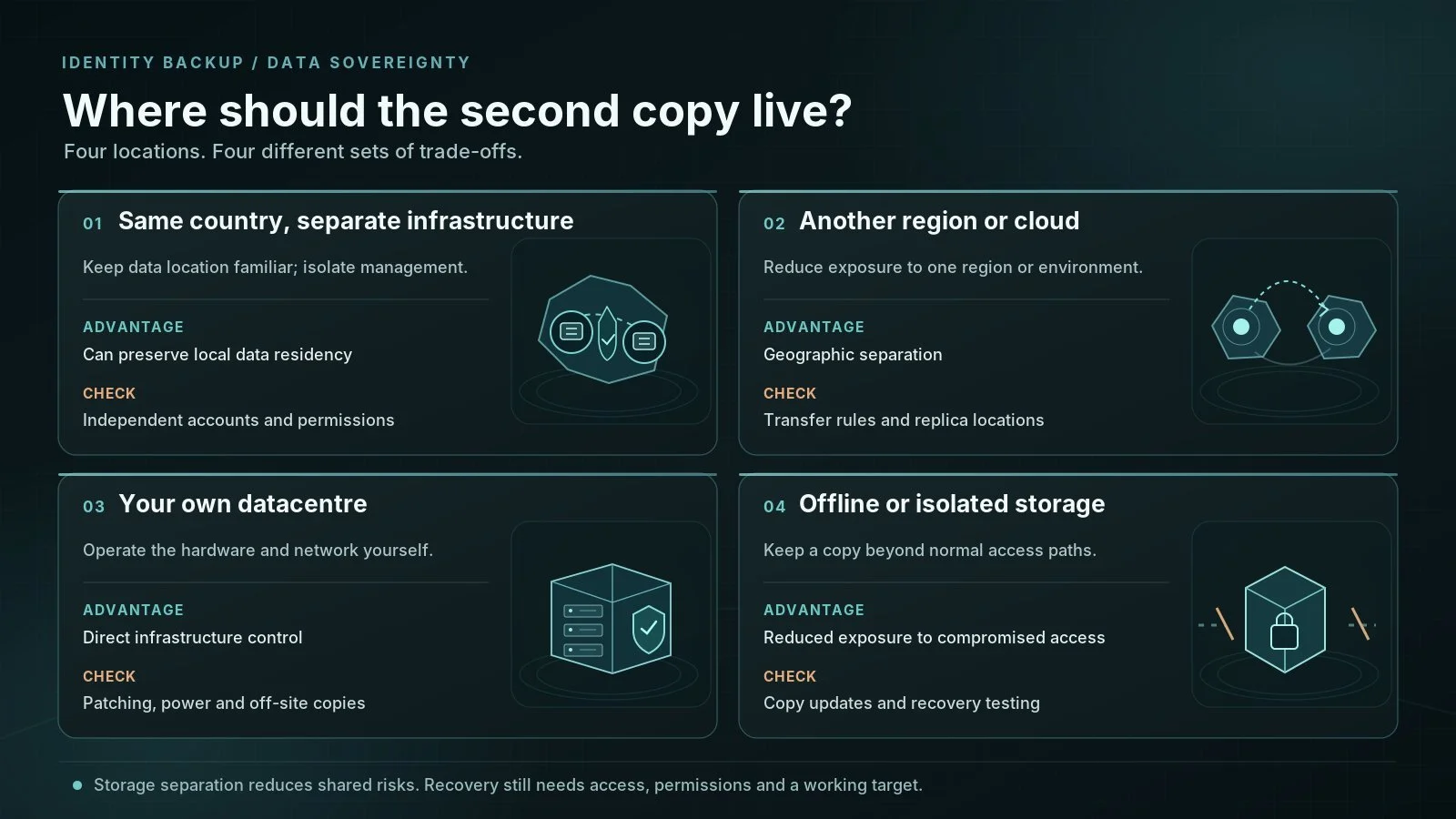
Where should the second copy live?
I'd decide this based on the failure scenario and the controls the organisation can realistically maintain.
Same country, separate infrastructure
This can make sense when data-location requirements are strict but you also want administrative separation from the identity service.
The important part is the separation. If the backup uses the same compromised identities, management accounts and permissions as production, moving it to another machine achieves very little.
Another region or cloud environment
A separate environment may help with regional outages and infrastructure failures.
But check the location of every copy, including replicas and offsite backups. A different region might improve availability while creating a problem for your data-residency or contractual requirements.
Your own datacentre
On-premises storage gives you direct control over the hardware, network and physical access.
It also gives you the responsibility for keeping those systems available and secure. If your backup sits on an unpatched VM, uses an ordinary domain administrator account and has no tested offsite copy, the ownership hasn't bought you much.
Offline or isolated storage
An offline copy can be valuable when the threat model includes ransomware or an attacker reaching the normal management environment.
But isolation needs to be real. You should know how the copy is created, when it becomes inaccessible to the production environment and how you'll retrieve it during recovery.
A database on a server someone describes as "air-gapped" is not proof of anything.
The cost of controlling your own backup
There's a reason managed services are popular. Somebody else looks after the infrastructure.
Once you operate a second copy yourself, the security of that copy depends heavily on your own work.
You own patching, monitoring, storage capacity, access controls and recovery testing. You also need to decide how encryption keys are managed, who can access backup files and how long historical copies remain available.
Identity backups deserve more protection than ordinary configuration exports. They can reveal users, groups, privileged assignments, application relationships and details of your security environment.
And location alone doesn't settle the regulatory question. Storing a backup in the EU, for example, doesn't remove the need to assess access from other countries, processing arrangements and applicable data-transfer rules.
If your team can't maintain an independent copy properly, a more limited but well-operated recovery setup may be safer than a neglected self-hosted backup.
I'd rather rely on a recovery plan somebody actually tests than a second server everybody assumes is fine.
How Kasca fits into this
Kasca takes a different approach to storage ownership. The backup application runs on infrastructure the customer operates, and the backup data remains in the customer's database.
That gives the customer control over where the backup environment is hosted and how its infrastructure is protected. It also allows the customer to design additional storage separation and copies around their own requirements.
There are recovery boundaries worth being clear about.
Kasca can recreate supported objects after permanent deletion, but that doesn't preserve the original Object ID or recover properties Microsoft doesn't expose, such as user passwords and application secrets.
Kasca also currently uses Entra ID for application sign-in. If access to the tenant is lost, the backup data remains on customer-controlled infrastructure, but normal access to the Kasca application may be affected.
That is why storage independence, application access and the ability to restore into Entra should be evaluated separately.
Explore the Kasca demo to see the product's current backup and recovery workflow.
A decision sequence that holds up
If you're choosing where to store Entra ID backups, I'd work through these questions in order.
1. What are you actually trying to recover from?
An accidentally changed group is different from a hard-deleted application, a compromised admin account or a Microsoft service outage. Don't design all four around the same assumption.
2. How much history do you need?
If a bad change could go unnoticed for weeks or months, Microsoft's seven-day native backup retention may not meet your requirements. Decide how far back you need to go before choosing the storage.
3. Who must be unable to reach the backup?
Consider compromised tenant administrators, internal infrastructure administrators and third-party providers. A backup that shares every administrative boundary with production is not particularly independent.
4. Where are you allowed to keep the data?
Check your actual legal, contractual and organisational requirements. Consider the primary copy, replicas, support access and any cross-border transfers.
5. Can you use the copy during the incident you planned for?
Test authentication, backup access, restore permissions, object dependencies and recovery into the target environment. Document what needs to be recreated manually.
A backup database that survives an incident is useful. Knowing exactly what you can recover from it is better.
Questions worth settling before you choose
Can I choose where Microsoft's native Entra ID backups are stored?
Not independently of the tenant. Microsoft's native Backup and Recovery snapshots are kept in Microsoft-managed storage in the tenant's geographical location. You cannot select a separate customer-controlled destination for those snapshots.
Does storing Entra ID backups on-premises make them sovereign?
Not automatically. On-premises storage gives you more control over the infrastructure, but sovereignty also depends on administration, access, applicable laws, external services and operational practices. Physical location is only part of the assessment.
Can an independent backup restore a locked Entra ID tenant?
Not necessarily. An independent backup may preserve the data, but accessing the backup application and restoring objects into Entra are separate requirements. Confirm both before treating a second copy as a tenant-compromise recovery plan.
The part you get to choose
You don't have much say in how Microsoft operates its native Entra backup. And in plenty of situations, you don't need to.
The choice comes when you decide whether you need another copy, and how independent that copy should be.
Choose its location. Separate its access. Protect it as sensitive data. Test what you can actually restore.
Then you'll know what the second copy is worth.
Choose where your second Entra ID backup lives
Microsoft controls where its native backup is stored. With Kasca, you can keep a separate copy of supported identity data on infrastructure you operate. Explore the product and see what that control looks like in practice.
Data sovereignty and Entra ID backup FAQ
Practical questions about backup location, GDPR, storage isolation, encryption and regulatory requirements.
Does GDPR require Entra ID backups to be stored in the EU?
No. GDPR doesn't impose a blanket requirement to store personal data within the EU. Transfers outside the EEA are possible, but they must meet the applicable GDPR requirements, including Chapter V. Your industry or contracts may impose additional restrictions. An EU storage location alone doesn't establish compliance.
Can customer-controlled Entra ID backups run in a private cloud?
Yes, if the backup software supports that deployment. Customer-controlled doesn't necessarily mean on-premises. You can operate backup infrastructure in a private cloud or a dedicated cloud environment. What matters is who administers the storage, controls access and manages the copies.
Can someone outside the EEA access EU-hosted identity backup data?
Potentially. Keeping data in an EU datacentre doesn't prevent remote access. Making personal data available to a separate organisation outside the EEA may qualify as an international transfer under GDPR, even if the data never leaves the storage region. Check support access, subprocessors and applicable transfer safeguards alongside the physical location.
What's the difference between immutable and air-gapped identity backups?
Immutability protects a backup from modification or deletion for a defined period. Air-gapping separates the backup from the normal production access path, physically or through controlled isolation. They're different protections, and neither automatically guarantees a successful restore. You still need to test access, integrity and recovery.
Who should control the encryption keys for Entra ID backups?
That depends on your security model and the backup product's capabilities. Customer-managed keys offer additional control, but also responsibility for their protection and recovery. Find out who can decrypt the data, where keys are stored and how you'd recover a backup if the usual key-management service became unavailable. An encrypted copy is useless if you've lost the only key.
Do DORA or NIS2 require self-hosted identity backups?
Neither creates a general requirement to self-host identity backups. For organisations within their scope, the focus is on appropriate risk management, business continuity, backup protection and recovery capability. DORA also contains specific backup and segregation requirements for covered financial entities. The deployment model matters less than whether your controls meet the requirements that actually apply to your organisation.