Self-Hosted vs SaaS IdentityBackup: Which Deployment Model Fits Your Risk Profile?
In this article
Choosing an identity backup tool is also choosing who operates it, where the recovery copy lives, and who can reach it when something breaks. SaaS is easier to run. Self-hosting gives you more control. Hybrid sits somewhere in between. None of them removes the need to test a restore.
So which deployment model fits your risk profile? Start with the trade-offs, not the sales pitch.
Three deployment models, three sets of trade-offs
SaaS (Software as a Service). The vendor hosts and operates the backup application. You subscribe, configure the service, connect the systems you want to protect and manage who gets access. You do not maintain the vendor's servers, but you are still responsible for the decisions that determine what gets backed up, who can restore it and whether your recovery plan works.
Self-hosted. You run the backup software yourself, on your own servers or in a cloud account you manage. That gives you more say over storage, patching and access. It also means you maintain the operating system, software and supporting services. Self-hosted does not automatically mean on-premises, offline or air-gapped.
Hybrid. A vendor may operate the control plane while backup data goes to storage you control. That can reduce application maintenance without putting every backup copy in vendor-hosted storage. The important detail is what the vendor-operated control plane can still access or disable, and what recovery looks like when it is unavailable.
Where SaaS wins
Speed and convenience. You can often get started without deploying a server, planning upgrades or managing a backup database. The vendor handles its own platform maintenance and rolls out product updates. Your team can spend more time on policies, permissions and recovery tests.
The trade-off is that you accept the provider's release schedule, operating model and contractual terms. Pricing can be straightforward, but it can still change with the number of protected identities, workloads or storage used. And if the service is unreachable, you need to know what remains accessible.
For a small IT team, those trade-offs may be entirely reasonable. Less infrastructure to maintain is a real benefit, not a weakness.
Where self-hosted wins
The main advantage is control. You choose where the backup runs, which administrators can reach it, when to update it, and how to protect its storage. That can matter when your security policy requires a specific location, a separate administrative boundary or a more restricted network.
You also decide when software updates go live. That sounds comfortable until an important security patch is released on a Friday afternoon. Then you are the team responsible for applying it.
Self-hosted can be cheaper at some scales, but not simply because the licence is cheaper. Count the servers or cloud resources, storage, backup copies, monitoring, patching, staff time and restore tests. The answer may surprise you in either direction.
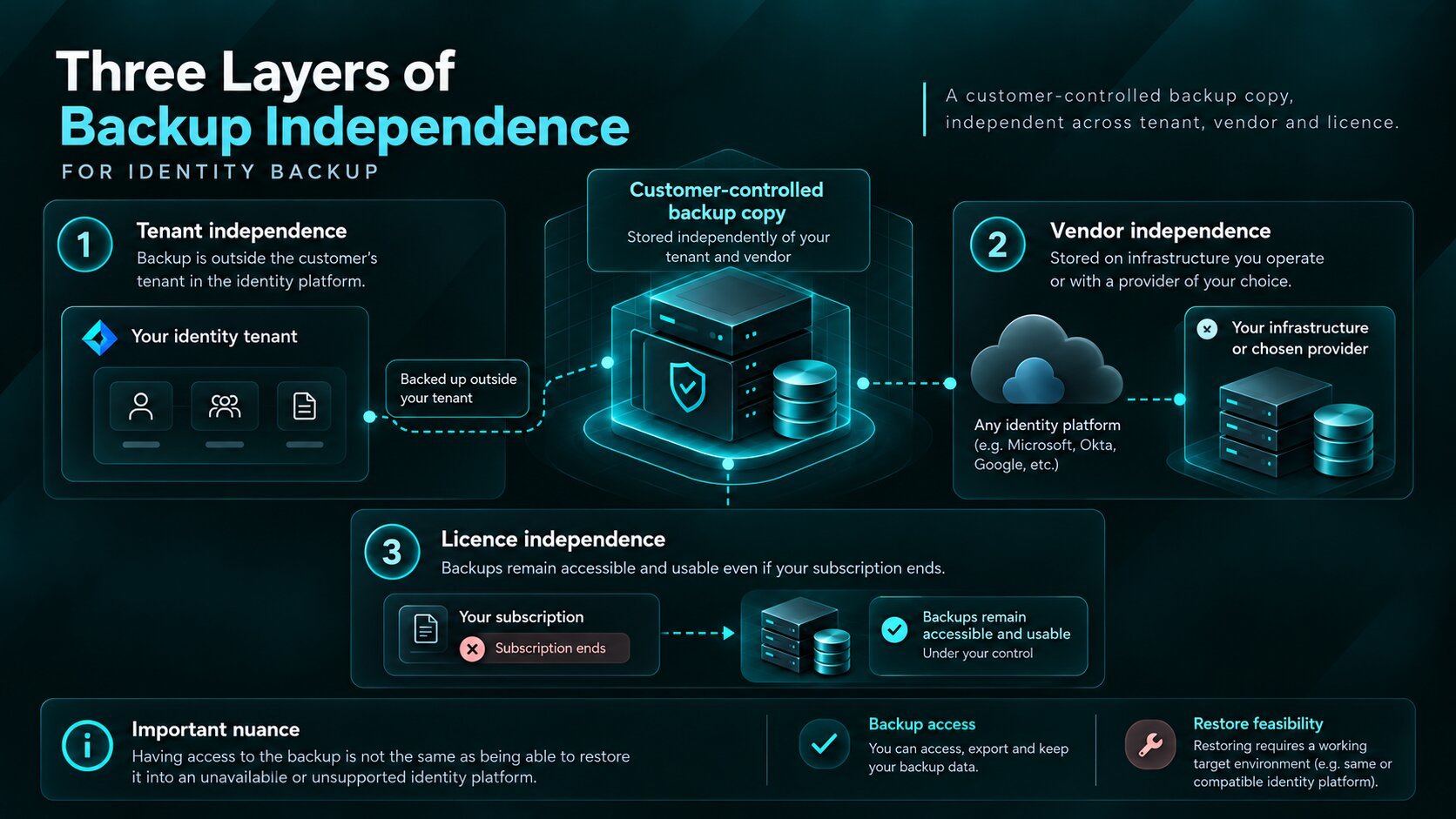
Three layers of backup independence
For identity backup, deployment is only half of the discussion. The other half is what your recovery process still depends on. We break that down into three layers in our article on backup independence.
Tenant independence. The backup copy is stored outside the tenant it protects. If someone compromises tenant administration, that alone should not give them control of the separate copy. This only works if storage, credentials and administrative access are genuinely separated.
Vendor independence. The backup remains on infrastructure you operate instead of being held exclusively in the backup provider's cloud. You still need to understand software, encryption-key and support dependencies.
Licence independence. You can access and use existing backups when a paid subscription ends. Do not assume that from the location of the files alone; check the actual restore rights and licence mechanism.
Important distinction. Being able to reach your backup is not the same as being able to restore it into an unavailable identity platform. For example, writing objects back to Microsoft Entra ID still depends on a usable target service and sufficient permissions. Plan and test those failure cases separately.
These questions matter even if you rely on native recovery. Our Microsoft Entra ID backup best practices guide covers recovery scope, emergency access and restore testing in more detail.
What self-hosting costs you
Owning the environment also means protecting it. You manage the hosts, databases, storage capacity, software updates and access controls. You monitor failed jobs and make sure backups are usable, not just marked as successful.
And the location matters. A backup running on a virtual machine in the same cloud subscription, protected by the same administrator accounts as the systems it is meant to recover, may still sit inside the same failure domain. Moving the software onto your own VM does not fix that by itself.
Failure boundary explained
One compromised account.
Two very different outcomes.
Self-hosting gives you control over the backup environment. But if the same privileged account can administer both systems, they may still share the same failure boundary.
Scroll to follow the access paths
A separate copy can still sit within the same administrative boundary.
Conceptual example, not a Kasca product interface
-
01 Starting point
One shared admin boundary
The same privileged credentials can reach both your identity tenant and your backup. A separate server or storage account does not, by itself, separate administrative access.
Follow the credentials, not just the location of the copy.
-
02 Incident
An account is compromised
If that account has sufficient privileges, an attacker may be able to change tenant settings and tamper with the backup environment too.
One compromised access path can expose both environments.
-
03 Better isolation
Separate the access paths
Use independent backup administration, accounts and permissions to limit how far a tenant-level compromise can spread. Recovery still needs its own tested access path.
Separate access reduces risk. It does not guarantee an uncompromisable backup.
Separate the backup's administrative access, keep an additional protected copy where your risk model calls for it, and document how you would restore without your normal tools or sign-in path.
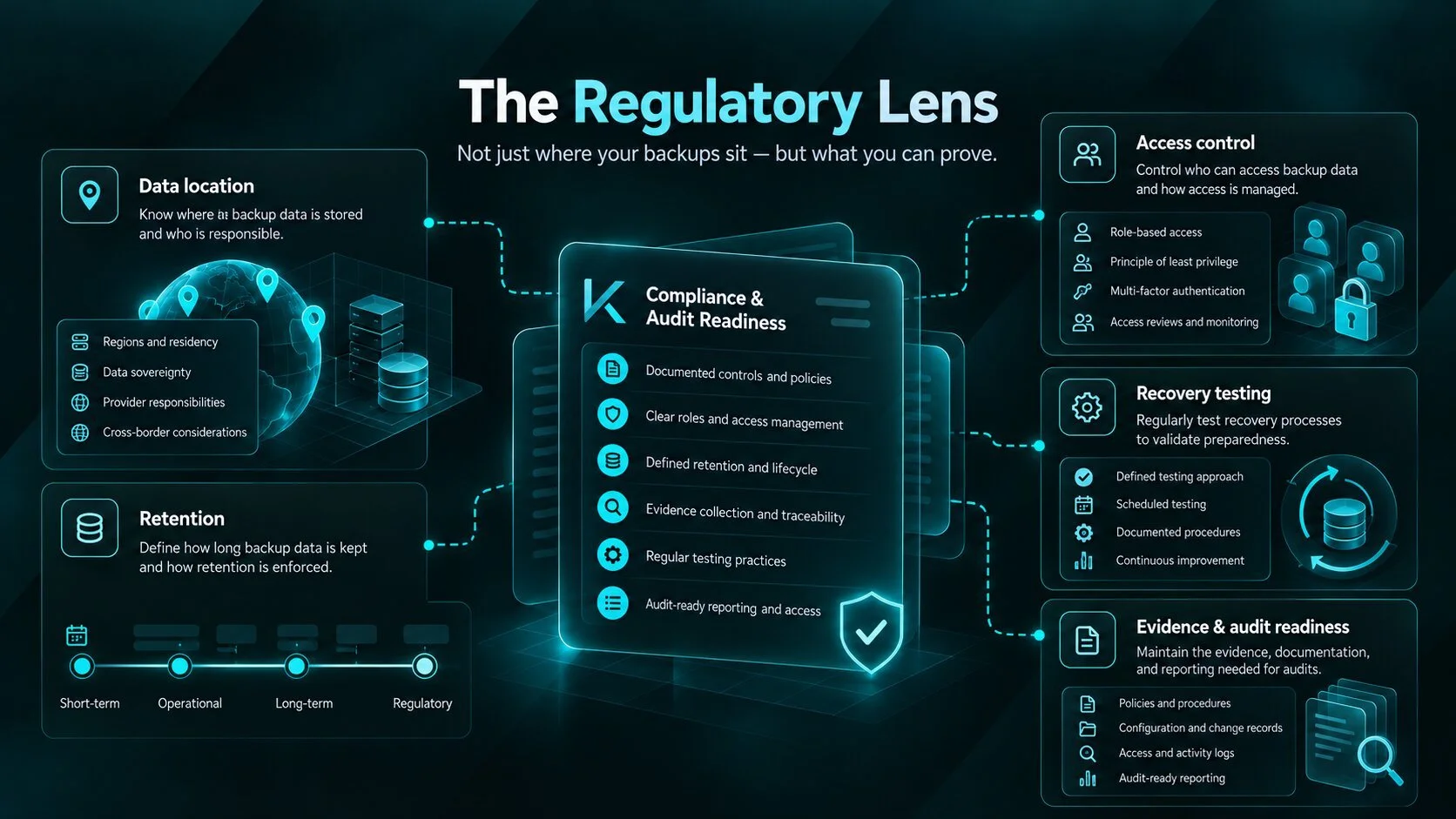
The regulatory lens
Backups are sensitive data too. An identity backup can contain directory information, application configuration, access relationships and other records that deserve the same care as the live system.
For regulated teams, the question is not simply whether the software is SaaS or self-hosted. It is whether you can explain who has access, where copies are kept, how long they are retained and how the service would be recovered or replaced.
The EU's Digital Operational Resilience Act (DORA) addresses ICT third-party risk and, for covered financial entities, exit strategies for ICT services supporting critical or important functions. The NIS2 Directive includes business continuity, backup management and disaster recovery among the relevant cybersecurity risk-management measures for entities within its scope.
Neither is a blanket ban on SaaS, nor does choosing self-hosted automatically make you compliant. Your exact obligations depend on your organisation and the applicable rules. In either model, be prepared to show how recovery works rather than pointing to where the backup sits.
Decision guide
There is no universal winner. Use the table as a starting point, then weigh the controls you already operate and the incidents you need to recover from.
| Question | SaaS | Hybrid | Self-hosted |
|---|---|---|---|
| Who runs the backup application? | Vendor | Usually vendor-operated control plane | Your team |
| Where is the backup copy? | Typically vendor-managed storage | Often customer-controlled storage | Storage you select and operate |
| Who handles updates? | Vendor | Shared, depending on the architecture | Your team |
| Main advantage | Lower operational overhead | Convenience with more storage control | Control over the full environment |
| Main question to verify | What if the vendor service is unavailable? | What can the control plane still access? | Can your team keep it secure and recover it? |
The exact architecture and contractual terms vary by provider. Verify them rather than relying on the deployment label.
Questions to ask any vendor
Where is the backup copy stored, and under whose administrative control?
Who can read, export, delete and restore it?
How are encryption keys and recovery credentials managed?
Can you access an existing backup if the service or identity tenant is unavailable?
What happens to your backups and restore rights when the contract ends?
What product telemetry or external connectivity is required?
Have you actually tested the recovery scenario you are buying protection for?
One final rule: ask the vendor to demonstrate the difficult case, not just the successful backup job. Our guide to what an Entra ID recovery strategy needs to protect is a useful checklist for that conversation.
Keep your identity backup under your control
Kasca runs on infrastructure you operate and keeps a separate copy of supported identity data. Explore the product and see how it fits your recovery requirements.
Self-hosted vs SaaS identity backup FAQ
Common questions about deployment models, storage control, security and recovery independence.
What is the difference between SaaS and self-hosted identity backup?
With SaaS, the vendor operates the backup application and typically manages its storage. With self-hosted backup, your team runs the software and controls the infrastructure. SaaS reduces operational overhead, while self-hosting gives you more control and responsibility.
Does self-hosted identity backup have to run on-premises?
No. Self-hosted software can run on physical servers, virtual machines or infrastructure inside a cloud subscription you manage. The defining difference is who operates and controls the environment, not whether the hardware is in your own data centre.
Is self-hosted identity backup automatically more secure?
No. Self-hosting gives you more control over storage, access and updates, but your team also becomes responsible for securing and maintaining the environment. A poorly protected self-hosted backup can be less resilient than a properly managed SaaS service.
How does hybrid identity backup work?
A hybrid model typically combines a vendor-operated control plane with backup storage controlled by the customer. This can reduce maintenance work while giving your organisation more control over data location. The exact responsibilities and dependencies vary by provider.
Can an independent backup restore data if Entra ID is unavailable?
An independently stored backup may remain accessible when the tenant is unavailable. However, restoring objects back into Microsoft Entra ID requires an available target service and appropriate permissions. Backup access and actual recovery are separate requirements.
What happens to identity backups when a subscription ends?
That depends on the provider's terms and licensing model. Check how long your data remains available, whether it can be exported, and whether existing backups can still be restored after cancellation. Owning the storage does not automatically guarantee licence independence.